FUZZER CONFIG
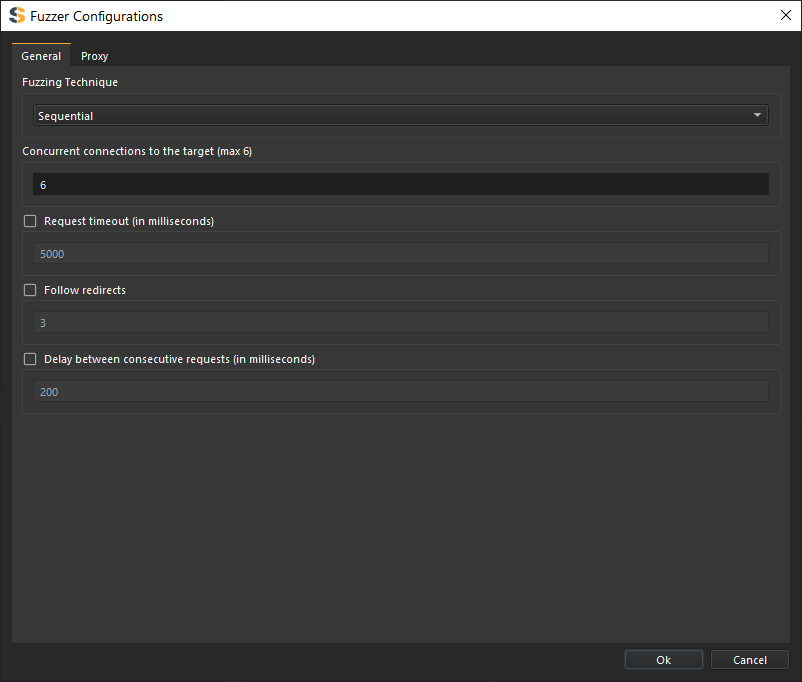
Configurations for the Fuzzer.
General Configs
Fuzzing Technique
- Sequential - Fuzzes by place one payload after another.
- Parallel - Fuzzes by replacing all markers with new payload with each iteration.
This is only applied to multiple marker fuzzing.
Concurrent Requests (Connections)
Configure how many simultaneous requests the fuzzer can make.
- Low (1-5) - Conservative, suitable for small servers
- Medium (5-10) - Balanced approach
- High (10-20) - Fast crawling for robust servers
For Standard Edition only max of 6 concurrent requests are allowed.
High concurrency can overwhelm small servers or trigger rate limiting. Start with lower values and increase if needed.
Request Timeout
Sets the maximum waiting duration in milliseconds for a request to elicit a response from the target server.
- Checked (True): If the timeout is reached, the request is aborted and closed.
- Unchecked (False): The request remains active until it gets a response or hits a hard 30-second threshold.
Follow Redirects
Configures how the Fuzzer handles 3XX response status codes.
- Checked (True): The fuzzer automatically follows the redirection URL. You may also set the Maximum number of redirects to follow.
- Unchecked (False): The fuzzer saves the redirect result but will not follow it, continuing to other links instead.
Delay between Consecutive Requests
Sets the wait time (in milliseconds) between sending sequential requests to the same target server.
- Checked (True): The fuzzer waits for the specified duration before sending the next request. This is recommended for targets that:
- Unchecked (False): The fuzzer sends requests in a "tight loop" for maximum speed.
Checking this will significantly slow down the overall fuzzing process.
Proxy Config
Configure proxy server details:
- Proxy type - HTTP, HTTPS, SOCKS4, SOCKS5
- Host - Proxy server address
- Port - Proxy server port
- Authentication - Username/password if required
- Custom CA certificates - Add trusted certificates
Disabling SSL verification can expose you to security risks. Only use this option in controlled testing environments.