Bruteforce Crawler
This guide walks you through the process of crawling a website using Bruteforce crawler.
Why and when to use bruteforce crawler
Best for: Discovering hidden resources
Attempts to find pages and directories by testing common paths and filenames.
Use when:
- Looking for hidden admin panels
- Finding backup files
- Discovering API endpoints
Configurations
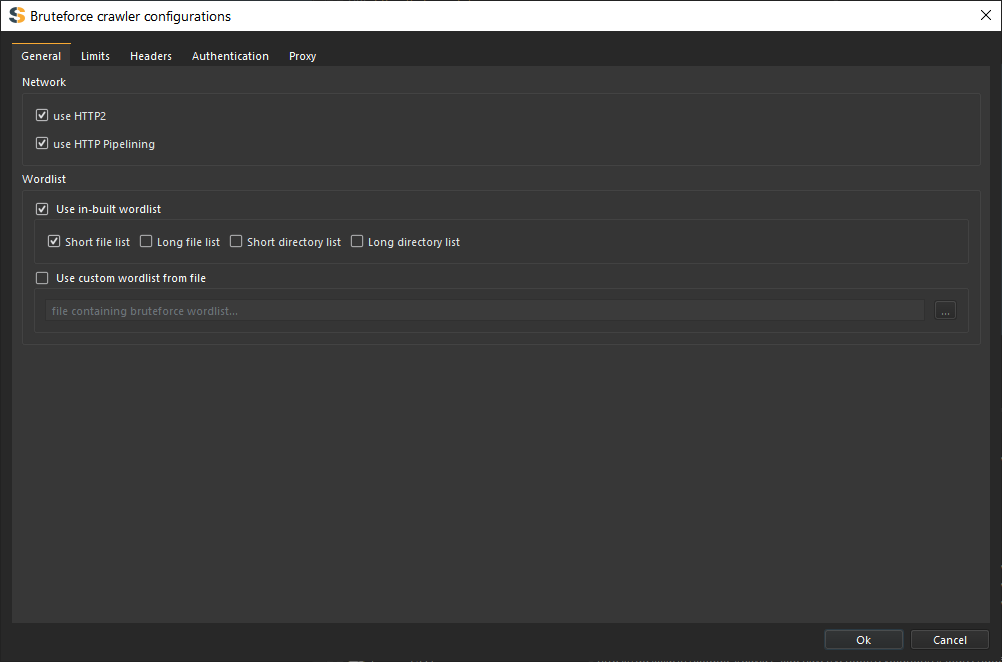
Use HTTP2
Configures the use of HTTP version 2 protocol for request to the target server. If a server turns out to not support HTTP/2 the spider will fall back to using HTTP version 1 by default. HTTP/2 is the second version of the HTTP protocol aiming to make applications faster, simpler, and more robust by improving many of the drawbacks of the first HTTP version. Has features including;
- Binary protocols - Binary protocols consume less bandwidth, are more efficiently parsed and are less error-prone than the textual protocols used by HTTP/1.1.
- Multiplexing - HTTP/2 is multiplexed, i.e., it can initiate multiple requests in parallel over a single TCP connection. As a result, web pages containing several elements are delivered over one TCP connection.
- Header compression - HTTP/2 uses header compression to reduce the overhead caused by TCP’s slow-start mechanism.
- Server push - HTTP/2 servers push likely-to-be-used resources into a browser’s cache, even before they’re requested. This allows browsers to display content without additional request cycles.
- Increased security - Web browsers only support HTTP/2 via encrypted connections, increasing user and application security.
HTTP Pipelining
Configures the spider to use http-pipelining technique to increase speed and efficiency. Works when using HTTP/1.
HTTP pipelining is a feature of HTTP/1.1 which allows multiple HTTP requests to be sent over a single TCP connection without waiting for the corresponding responses. HTTP/1.1 requires servers to respond to pipelined requests correctly, with non-pipelined but valid responses even if server does not support HTTP pipelining. Despite this requirement, many legacy HTTP/1.1 servers do not support pipelining correctly, forcing most HTTP clients to not use HTTP pipelining. The technique was superseded by multiplexing via HTTP/2.
Wordlist
Configure wordlist to be used by the bruteforce crawler.
Use In-built wordlists
You can configure the crawler to use in-built wordlists for bruteforcing webpages.
OR
Use Custom wordlists
You can add your own file containing all wordlists to be used for bruteforcing webpages.
The added custom file must contain a single path for each new line.
Follow robots.txt Exclusions
Configures the crawler to follow the “/robots.txt” exclusions if available. The robots.txt exclusion is highly dependent on the user-agent used hence the crawler will follow the exclusions according to the user-agents you’ve chosen.
The robot’s exclusion standard, also known as the robot’s exclusion protocol or simply robots.txt, is a standard used by websites to communicate with web crawlers and other web robots.
Show failed requests (4XX and 5XX)
Configures the crawler not to discard 4XX and 5XX error responses and instead, add them to database and send them to sitemap. Connection, SSL and other system errors will not be added to sitemap only error responses with 4XX and 5XX.
Crawling
Select Crawler Type
Choose the 'Bruteforce Crawler' option from the dropdown menu.
Enter Target URL base
- Enter the target URL base in the URL Target field
- Ensure the URL includes the protocol (
http://orhttps://) - Verify the URL is accessible
Examples:
https://example.comhttps://api.example.com/v1http://localhost:3000
The crawler with bruteforce pages starting from the base of the target,
hence if the base is https://example.com/v1/ pages will be added starting from the end of the base target https://example.com/v1/*
Configure the crawler
Click the configuration icon to access and configure crawler settings.
The used wordlist can also be set using the configuration dialog.
Start Crawling
Click the [Start] button to begin the crawl. The crawler will immediately start processing the target.
Monitor Progress
Watch the progress indicator in the right corner:
Progress: <pages_crawled> / <pages_crawled>
Because the bruteforce crawler reads the worldist file by streaming one line at a time, the crawler does not have information about the total number of pages its going to crawl hence the progress only shows crawled pages.
Control Crawling
While crawling, you have several control options:
Pause Crawler
- Click
[Pause]to temporarily stop crawling - Already-sent requests will complete
- Pages in queue remain for resume
Resume Crawler
- Click
[Resume]to continue from where you paused - The crawler picks up immediately
Stop Crawler
- Click
[Stop]to terminate the crawl completely - Waits for in-flight requests to complete
- Cannot be resumed - must start fresh
Crawler Behavior
The sitemap updates in real-time as pages are discovered.
Understanding Crawler Actions
When you Pause:
- Stops sending new requests
- Processes responses already received
- You may see a few more pages added to sitemap
- Can resume at any time
When you Stop:
- Terminates crawler threads
- Waits for pending responses
- Cleans up resources
- Cannot resume - state is lost
After clicking Stop or Pause, you may see pages still being added to the sitemap. This is normal - the crawler is processing responses that were already in flight.