Archive Crawler
This guide walks you through the process of crawling archived URLs using Archive Crawler.
Why and when to use Archive Crawler
Best for: Discovering historical content and forgotten endpoints
Archive Crawler obtains URLs from internet archives and then crawls every discovered URL to identify pages, endpoints, files, parameters, and historical attack surfaces that may no longer be linked from the live website.
Use when:
- Discovering legacy web pages
- Finding removed or hidden content
- Enumerating old API endpoints
- Expanding attack surface coverage
- Collecting historical URLs for analysis
- Identifying forgotten files and backups
Configurations
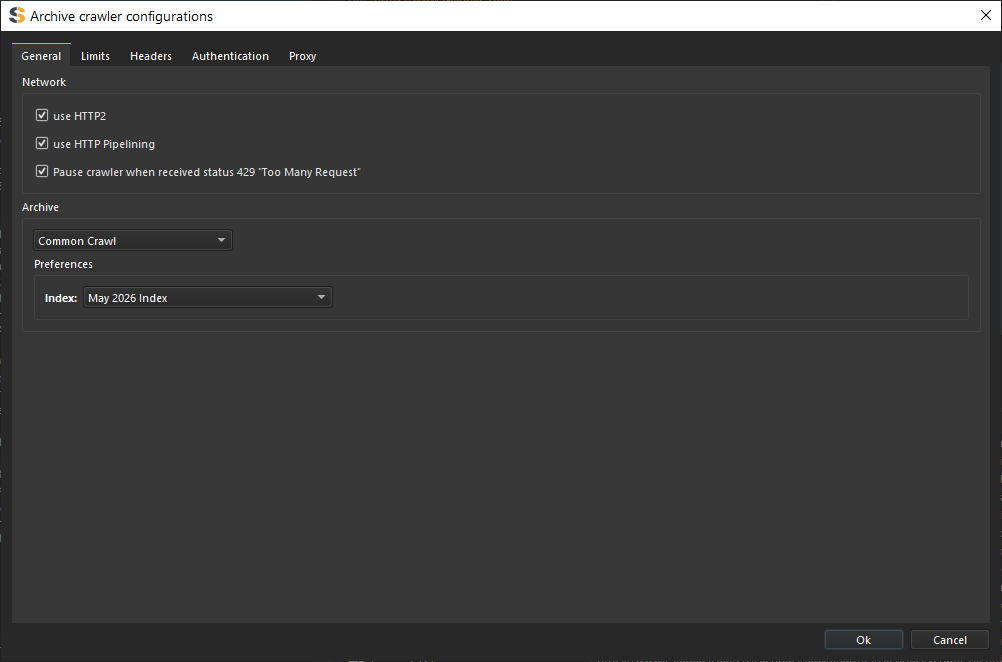
Archive Sources
Configure which archive providers should be queried for URLs.
Common Crawl
Queries Common Crawl indexes to obtain archived URLs belonging to the target domain and its subdomains.
Benefits:
- Massive web-scale dataset
- Historical coverage across many years
- Fast URL enumeration
- Useful for discovering pages not present in other archives
Wayback Machine
Queries the Wayback Machine CDX API to obtain archived URLs captured over time.
Benefits:
- Historical snapshots
- Excellent coverage of older websites=
- Useful for discovering removed content
Include Subdomains
Configures the crawler to collect URLs from all subdomains associated with the target domain.
Examples:
- api.example.com
- admin.example.com
- cdn.example.com
- old.example.com
Deduplicate URLs
Removes duplicate URLs returned by multiple archive providers before crawling begins.
This reduces unnecessary requests and improves performance.
Follow Redirects
Configures the crawler to automatically follow HTTP redirects encountered while crawling archived URLs.
Ignore URL Parameters
Normalizes URLs by removing query parameters when performing deduplication.
Example:
The following URLs would be treated as the same resource:
Crawl Depth
Controls how deep the crawler should continue following links discovered from archived pages.
- Depth 0: Crawl only archive-discovered URLs
- Depth 1: Follow links found on archive-discovered URLs
- Depth 2+: Continue recursively following discovered links
URL Limit
Limits the maximum number of archive URLs that will be crawled.
Useful when archives contain millions of URLs.
Archive Collection Process
Query Archive Providers
The crawler queries selected archive providers such as Common Crawl and Wayback Machine.
Collect URLs
All URLs matching the target domain are collected from archive datasets.
Normalize and Deduplicate
URLs are normalized and duplicate entries are removed.
Apply Filters
Configured filters such as extensions, subdomains, and parameter handling are applied.
Crawl URLs
Each remaining URL is requested and analyzed.
Store Results
Pages, files, endpoints, parameters, technologies, and responses are added to the sitemap and database.
Links discovered during crawling will not be crawled only the ones obtained from Archive.
Crawling
Select Crawler Type
Choose the 'Archive Crawler' option from the crawler dropdown.
Enter Target Domain
Enter the target domain or URL.
Examples:
Configure Archive Sources
Select one or more archive providers:
- Common Crawl
- Wayback Machine
Configure Crawl Settings
Adjust crawl depth, filters, URL limits, and response handling options.
Start Crawl
Click the Start button to begin archive enumeration and crawling.
Review Results
Monitor discovered URLs, pages, files, API endpoints, parameters, and technologies from the sitemap and results views.