Fuzzer
This guide explains how to use the Fuzzer tool to automate request fuzzing, analyze application behavior, and discover hidden functionality.
Why and when to use Fuzzer
Best for: Parameter testing, resource discovery, input validation analysis, and automated request variation testing.
The Fuzzer tool functions similarly to burp suite's intruder testing tool. It allows users to define one or more fuzzing positions within an HTTP request and automatically generate requests using configurable payloads.
The tool can send thousands of modified requests while monitoring responses for behavioral differences, making it useful for discovering hidden resources, undocumented parameters, valid identifiers, and unexpected application functionality.
Use when:
- Testing request parameters
- Enumerating identifiers
- Discovering hidden files and directories
- Testing API endpoints
- Finding valid usernames or IDs
- Discovering undocumented functionality
- Analyzing application input validation
- Comparing response behavior
Fuzzer Interface
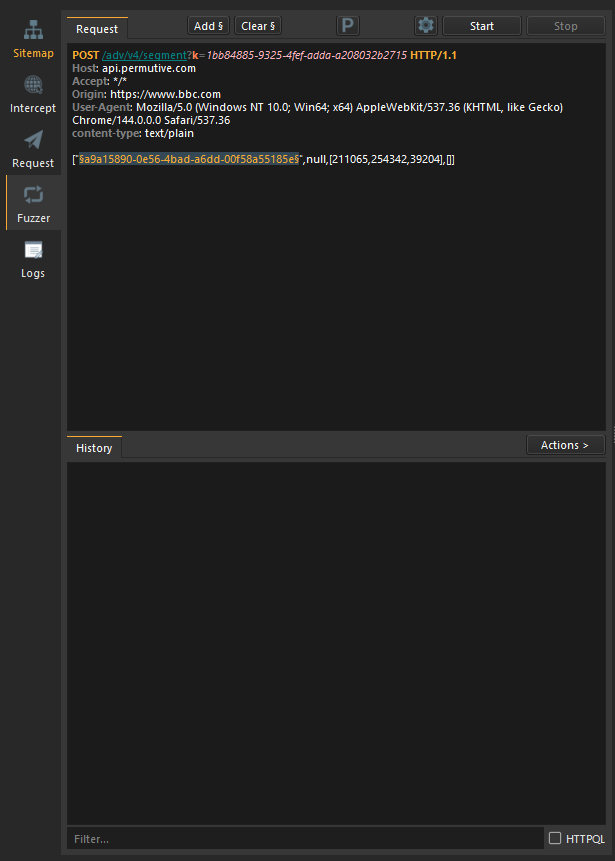
The Fuzzer interface consists of the following components:
Request Editor
The Request Editor allows users to create or modify HTTP requests.
Requests can be written manually or copied from:
- Intercept
- Request
- Crawler
- API Discovery
- History Views
Fuzz Markers
Specific portions of a request can be marked as fuzzing positions.
Example:
GET /api/users?id=§123§ HTTP/1.1
Host: example.com
The value enclosed by markers becomes a fuzzing position.
During execution, payload values are substituted into the marked location.
Multiple markers can be defined within the same request.
Example:
POST /api/users/§USERID§ HTTP/1.1
Host: example.com
Content-Type: application/json

{
    "role":"§ROLE§"
}
Payload Configuration
The Payload Configuration dialog allows payloads and payload processors to be assigned to each fuzz marker.
Each marker can have independent payload settings.
Payload Types
The Fuzzer supports four payload types.
Simple List
Uses a manually defined list of payload values.
Common uses:
- Username testing
- Parameter enumeration
- Resource discovery
- API testing
Runtime File
Loads payloads from an external file during execution.
Benefits:
- Supports very large wordlists
- Dynamic payload updates
- Reduced memory consumption
Common uses:
- Directory fuzzing
- Username wordlists
- Identifier enumeration
Numbers
Automatically generates numeric payloads.
Configurable options include:
- Start value
- End value
- Increment value
- Padding length
Common uses:
- User ID enumeration
- Record discovery
- Sequential identifier testing
Dates
Automatically generates date values.
Configurable options include:
- Start date
- End date
- Date interval
- Output format
Common uses:
- Historical record discovery
- Date filtering
- Schedule testing
- Report enumeration
Payload Processors
Payload processors modify payload values before they are inserted into requests.
Processors are configured independently for each marker.
Common operations include:
- Prefixing values
- Suffixing values
- URL encoding
- Base64 encoding
- Case conversion
- String formatting
Payload processors allow payloads to be transformed without modifying the original payload source.
Fuzzer Settings
The Configuration dialog allows control over request execution behavior.
Fuzzing Technique
Defines how requests are generated and processed.
Sequential
Processes requests one at a time.
Benefits:
- Easier response analysis
- Reduced server load
- Better compatibility with stateful applications
Recommended for:
- Authentication testing
- Session-based applications
- Rate-limited targets
Parallel
Processes multiple requests simultaneously.
Benefits:
- Faster execution
- High-volume testing
- Efficient large-scale enumeration
Recommended for:
- Resource discovery
- API testing
- Large payload sets
Follow Redirects
Automatically follows redirect responses.
Supported status codes include:
- 301 Moved Permanently
- 302 Found
- 303 See Other
- 307 Temporary Redirect
- 308 Permanent Redirect
When disabled, redirect responses are returned directly.
Request Timeout
Defines the maximum amount of time SpiderSuite waits for a response.
Proxy Configuration
Routes requests through a configured proxy server.
Supported proxy types:
- HTTP
- HTTPS
- SOCKS4
- SOCKS5
Typical uses:
- Traffic inspection
- Request monitoring
- Network debugging
- External routing
Fuzzer Controls
Start
Begins the fuzzing session.
Payloads are generated and requests begin processing according to the selected fuzzing technique.
Pause
Temporarily suspends the fuzzing session.
No additional requests are sent while paused.
Resume
Continues a previously paused fuzzing session.
Stop
Immediately terminates the fuzzing operation.
Previously collected results remain available for analysis.
Results View
As requests are processed, responses are displayed in the Results View.
Each result includes:
- Request number
- Payload value
- Status code
- Response size
- Response time
- Content type
Results can be sorted and filtered to identify anomalies and interesting responses.
History View
Every fuzzing session is automatically recorded in the History View.
Stored information includes:
- Session timestamp
- Request template
- Payload configuration
- Fuzzing technique
- Request count
- Response count
- Execution duration
Reopening Sessions
Previous fuzzing sessions can be reopened for review and analysis.
This allows users to:
- Compare results
- Continue testing
- Reuse configurations
- Investigate interesting responses
Fuzzing Workflow
Create or Paste a Request
Enter an HTTP request into the Request Editor.
Mark Fuzz Positions
Select portions of the request to be fuzzed.
Configure Payloads
Assign payload types and processors to each marker.
Configure Settings
Adjust fuzzing technique, redirects, timeout, and proxy settings.
Start Fuzzing
Click the Start button to begin execution.
Monitor Responses
Observe response codes, lengths, timings, and content differences.
Pause, Resume, or Stop
Control execution using the Fuzzer controls.
Review Results
Analyze responses and identify interesting findings.
Typical Workflow
Capture a request from Intercept or create one manually.
Mark parameters or values for fuzzing.
Assign payload sources.
Configure execution settings.
Run the fuzzing session.
Identify unusual responses and behavioral differences.
Send interesting results to the Request tool for manual investigation.
The Fuzzer tool integrates closely with Intercept, Request and Crawlers. Captured requests can be sent directly to the Fuzzer, enabling rapid testing of parameters, identifiers, files, endpoints, and application functionality.